
NCR Counterpoint POS System: What It Does, Who It Fits and How NPS Supports It
NCR Counterpoint is a specialty retail management system that runs your point of sale, inventory, purchasing, pricing, customer accounts, loyalty, reporting and every store location from one place, and we recommend it for retailers whose catalog, staff or store count has outgrown a basic register. Nationwide Payment Systems (NPS) is a certified partner of NCR. We sell Counterpoint, install it in person, program it, process the cards that run through it and support it afterward with a team dedicated to Counterpoint. This guide covers what the system does, which stores it fits and which it does not, what goes into the price, how an installation runs, and what changes if you already own Counterpoint and want a better dealer.
What is an NCR Counterpoint system, and who is it built for?
Counterpoint is a specialty retail point-of-sale system that combines sales, inventory, purchasing, loyalty, reporting and ecommerce in one platform. It was built for complicated retail, the kind of store that needs far more than a register that rings up a sale and prints a receipt. A lightweight POS records what sold. Counterpoint becomes the operating system for the business, so the same record that rings up a bag of feed also lowers the stock count, flags the reorder, applies the right customer price, posts to your reports and, if you sell online, updates the website.
That depth is the reason to choose it and also the reason it is not for everyone. A system this capable earns its keep when the catalog is large, the pricing is layered, the staff is big or the business runs more than one location. It is wasted on a store that sells a few hundred items to walk-in customers at one price.
The stores Counterpoint fits best
Counterpoint is at its best in inventory-heavy specialty retail. These are the strongest fits:
- Firearms dealers and gun shops, because serialized inventory and bound book integrations matter on every sale.
- Sporting goods stores, including golf, camping, fishing and hunting shops.
- Nurseries, lawn and garden centers and landscaping supply, with seasonal stock, bulk items and contractor accounts.
- Feed stores, farm and ranch supply and pet stores, where one item often carries several prices. We wrote a separate page on NCR Counterpoint for feed stores.
- Liquor, wine and package stores, especially multi-location operators with thousands of SKUs.
- Independent grocery stores with scales and specialty food retailers.
- Apparel and shoe stores, which need size, color and style tracking.
- Automotive aftermarket retailers.
- Attractions, zoos, aquariums, museum gift shops and minor league sports venues.
- Any multi-location specialty retailer, or any business with a large or complicated inventory.
The stores it does not fit
If you run one small store with a simple catalog and a couple of registers, Counterpoint is probably more system than you need, and we would rather tell you that on the first call than sell you something you will not use. For smaller shops we also offer a retail POS for convenience stores, smoke shops and small retailers, which is built for retailers with up to approximately 8,000 SKUs who need more than a basic terminal but less than a full retail management platform. If your store sits near that line, the checklist below will help you decide.
Is Counterpoint right for your store? A checklist
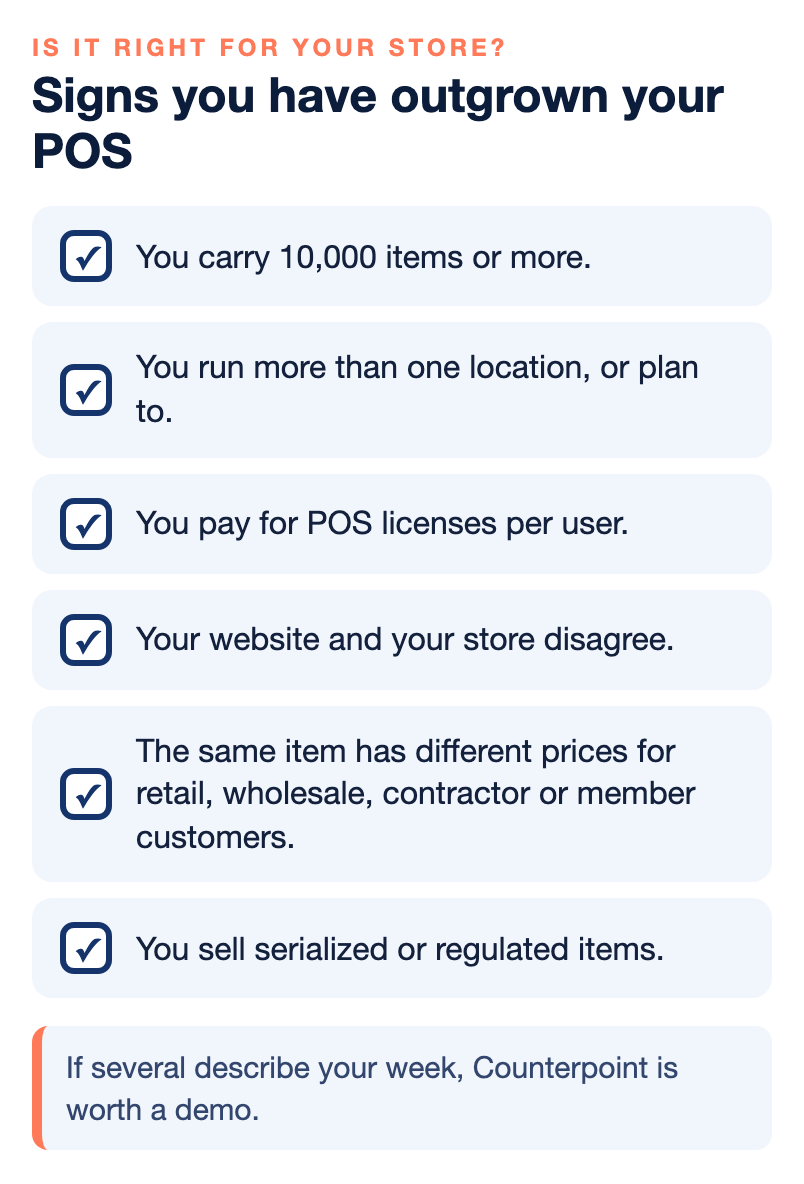
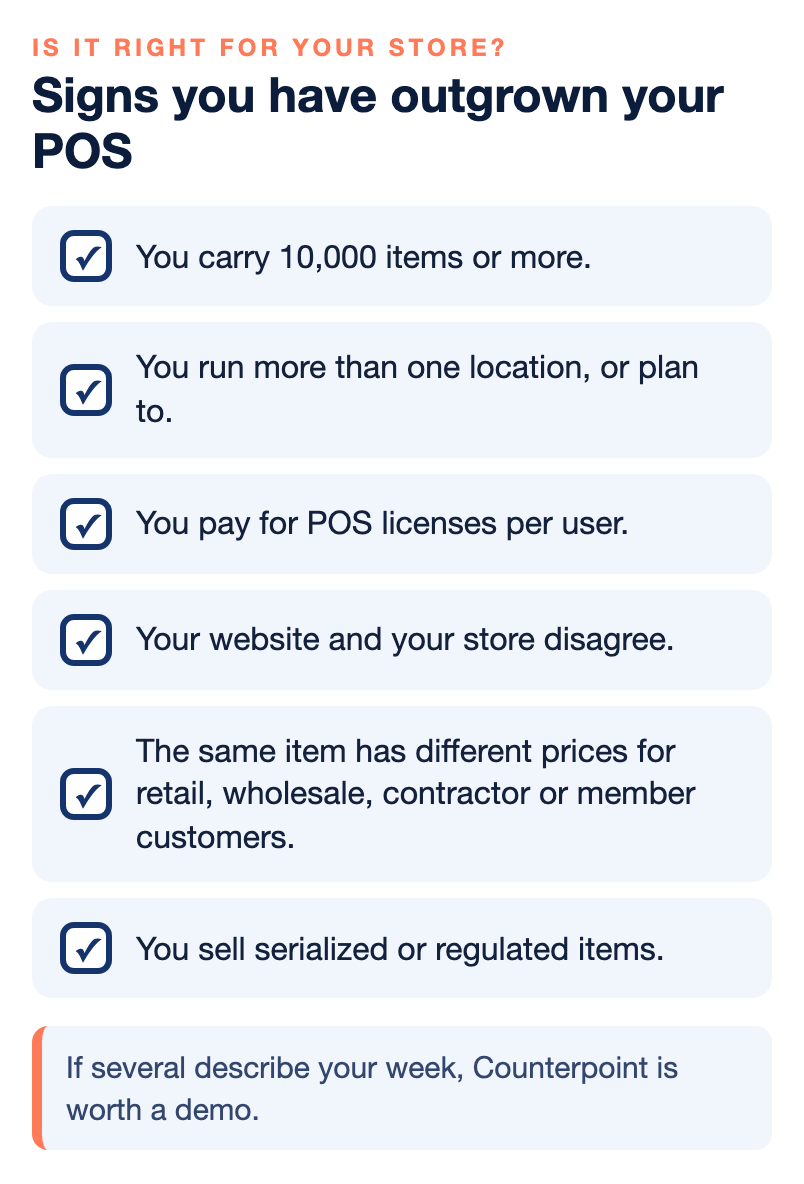
Most retailers do not replace a POS because the old one suddenly stops working. They replace it because the system gets harder to support, harder to connect to anything else, more expensive to maintain and less able to keep up with how the business runs today. These are the signs we hear most often from owners who end up on Counterpoint:
- You carry 10,000 items or more, or you are growing toward 50,000 or 100,000. Many small POS platforms begin to struggle when inventory passes a few thousand products.
- You run more than one location, or plan to, and stock, prices and purchasing do not stay in sync between stores.
- You pay for POS licenses per user, so every new cashier, manager or seasonal hire adds another license.
- Your website and your store disagree. Items show as in stock online after they sold out in the store, or prices differ between the two.
- You are several versions behind on an older Counterpoint, running on aging hardware or an old operating system.
- Purchasing, reordering and reporting are manual, built in spreadsheets after the store closes.
- You sell serialized or regulated items and need compliance records tied directly to your inventory.
- The same item has different prices for retail, wholesale, contractor or member customers.
- Payments run on a separate system from your POS, so reconciling the day is a chore and every problem turns into two phone calls.
If several of these describe your week, you have likely outgrown an entry-level system, and Counterpoint is worth a demo. If none of them do, keep what you have and spend the money somewhere else.
What Counterpoint does, capability by capability
Counterpoint is modular, so a feed store and an apparel chain can run the same core system and use very different parts of it. Here is the short version before we go through each area.
| Capability | What it handles | Who leans on it most |
|---|---|---|
| Inventory | Unlimited SKUs, real-time counts, serialized items, transfers | Large catalogs, firearms, multi-store retail |
| Pricing | Up to six price levels per item, customer and promotional pricing | Feed, garden, wholesale and contractor sales |
| Payments | Cards, tap, mobile wallets, EBT, ACH and AR payments | Every store, through one merchant account |
| Reporting | More than 100 built-in reports, custom reports, QuickBooks | Owners, buyers and bookkeepers |
| Customers | CRM, loyalty, gift cards, house accounts, email marketing | Repeat-purchase specialty retail |
| Ecommerce | Inventory, price and order sync with your online store | Retailers selling in store and online |
Inventory control
Inventory is where Counterpoint separates itself from most entry-level systems. There are no SKU limits, counts update in real time, and stock can be tracked by serial number, moved between stores and warehouses, and seen across one location or many from a single screen. Purchasing and vendor management sit in the same system, with automated purchasing rules such as minimums and maximums, days of supply and replenishment, so the reorder is based on what actually sold instead of what someone remembered. The result is fewer stockouts, tighter control and better buying decisions, which on a large catalog is often where the money is.
Pricing levels and promotions
Retail pricing is rarely one price for everyone. Counterpoint supports up to six pricing levels per item, along with customer-specific pricing, contract pricing, volume pricing, limited-time offers and buy-one-get-one promotions. The same bag of fertilizer can ring up at the retail price for a walk-in customer and at a contractor price for a landscaper with an account, without the cashier looking anything up. That protects your margins and lets you treat your best accounts like your best accounts.
Firearms and regulated items
Firearms and sporting goods retailers lean on Counterpoint because of its serialized inventory. Through NPS, Counterpoint integrates with the TRCG Bound Book and FastBound so your retail inventory and your compliance records stay connected, and every sale of a regulated item follows the workflow it should. Liquor and wine stores get age verification at checkout. For a dealer who cannot afford a gap in the records, this is often the deciding feature.
Checkout and payments
The register screen is built for speed, with multiple payment types, discounts and promotions handled on the ticket. A merchant account is included, so card processing is part of the system rather than a separate box on the counter. We cover payments, dual pricing and QuickBooks in their own section below, because for many owners that is where the daily savings show up.
Reporting that tells you something
Most POS reports tell you what happened. Counterpoint comes with more than 100 built-in reports covering sales and returns, gross margin, inventory turns, vendor performance, pricing, employee activity and location-by-location comparisons, and custom reports are available when the one you need does not exist. Counterpoint also offers smart alerts that send a text or email based on store activity, so you are not sitting in front of a report waiting for something to happen. If you need a report nobody has built, that is a job for our programming team.
Customers, loyalty and gift cards
Customer management is built in. Counterpoint keeps customer profiles and ticket history, runs loyalty programs and integrated gift cards, handles house accounts, accounts receivable tracking and statements, and supports targeted email marketing and upsell prompts at checkout. For a specialty store that lives on repeat customers, having all of that in the POS means you do not pay for and maintain three separate tools to do it.
Ecommerce that stays in sync
Through NPS, Counterpoint integrates with Shopify, WooCommerce and WordPress, Magento, BigCommerce and other ecommerce platforms. Inventory, pricing, product information and orders stay synced between the store and the website, so an item that sold out on the shelf stops showing as available online. When you update a price in Counterpoint or change a product picture, the shopping cart updates too. If you need a new website, we can help with that as well.
Service Point and mobile POS
Businesses that sell products and also do service work can use Counterpoint’s Service Point module for appointments, estimates, repairs and service workflows. Mobile POS moves checkout off the counter for outdoor sales, trade shows, events, sidewalk sales, large stores, garden centers and warehouses, so a line at the register can be worked from the floor.
One store or a hundred: multi-location retail and the industries we serve
Counterpoint is built to grow with the business, whether you run a single boutique or a regional chain. Inventory is tracked across every store, prices can be set by store, region or customer group, reports roll up across all locations, and purchasing can be run centrally or left to each store as you prefer. Transfer reports show what to move where, so stock goes to the store that will sell it.
What each industry uses
The same platform looks different from one kind of store to the next. These are the parts each industry tends to use most:
- Garden centers, nurseries, greenhouses and feed stores: seasonal and bulk inventory, built-in accounts receivable, returns, bulk sales and special orders.
- Gift shops, boutiques and specialty retail: item and customer details at the register, mobile POS for pop-up events and sidewalk sales, pricing by color, size or style, and shelf and vendor reports.
- Wine and liquor stores: barcode flexibility for thousands of SKUs, age verification at checkout, promotions and loyalty, and control of fast-moving and regulated items.
- Apparel and footwear: matrix tracking by size, color and style, seasonality and markdowns, and several price levels per SKU.
- Natural foods and grocery: item bundling, barcoded scales, items sold by the case, the single or by weight, automated reordering and margin alerts.
- Gourmet shops and delis: expiration alerts for perishables, customer details at checkout and suggestive selling based on purchase history.
If you are a mid-sized retailer who knows the current system is holding you back but cannot put a finger on why, our article on why mid-sized retailers are frustrated with their POS goes through the most common reasons.
Kiosks and self-checkout
Counterpoint runs on traditional stations with customer-facing screens, and it also supports kiosks and self-checkout. Kiosks do not replace your cashiers. Think of a kiosk as an extra cashier that never takes a break, helping during the busy hours when the line is longest.
Payments, dual pricing and QuickBooks in one system
Payments should be part of the POS, not an afterthought. When NPS installs Counterpoint, the merchant account is included and the processing is integrated into the system, so the person who answers for your register also answers for your card processing. Instead of the POS company blaming the processor and the processor blaming the POS company, you have one partner responsible for both, and one phone number for hardware, software and payments.
Through NPS, Counterpoint can accept credit and debit cards, tap-to-pay and contactless payments, Apple Pay and Google Wallet, EBT where it applies, and ACH. It also handles accounts receivable payments, integrated invoicing, recurring billing, online payment links and mobile checkout, which matters for garden centers, feed stores and other businesses that carry house accounts.
Choose your processing model
Not every business needs the same pricing structure, so we look at your payment mix first and then recommend one:
- Cost plus, also called interchange plus, a transparent structure that separates interchange and card-brand costs from the processor markup.
- Dual pricing, the 0% processing option, where eligible retailers may be able to offset much of their card-processing cost through a properly configured program.
- Custom programs for higher-volume or more complex merchants, priced on transaction mix, average ticket, debit volume and other factors.
Card-brand rules and state law govern how dual pricing and surcharging can be used, so confirm what is allowed where you operate before you turn either one on. Our guide to dual pricing vs. surcharging explains the difference in plain terms, and our case study on NCR Counterpoint and dual pricing shows how the two work together in a real store.
If you use QuickBooks, Counterpoint integrates with it as well, which cuts down the manual accounting between the retail system and the books. Card processing, dual pricing or cost plus, and QuickBooks all come from one vendor, so there are fewer tools to manage and fewer places for a number to go wrong.
Hardware, licensing and what goes into the price
Hardware: you may be able to keep some of it
Replacing a POS does not necessarily mean replacing every piece of equipment in the building. Depending on compatibility, existing hardware may be reusable, and we evaluate it as part of discovery. That includes POS stations, customer-facing displays, scanners, label printers, receipt printers, scales, payment terminals, kiosks and mobile devices. Counterpoint works with touchscreen terminals, iOS tablets for mobile POS and inventory counts, cash drawers, and USB, Ethernet and wireless peripherals, and it supports fingerprint readers for added security at the register. Where something needs replacing, we will say what and why.
Licensing: unlimited users, priced by station
Many business software platforms charge for every individual employee who logs in, and that gets expensive quickly. Imagine 25 cashiers, 10 managers, 5 inventory employees, plus purchasing, accounting, owners and regional managers. A system that looked inexpensive per user suddenly costs a great deal. With our Counterpoint setup you can have unlimited users, and licensing is based on the devices or stations being used rather than on every person who needs access. That makes Counterpoint especially attractive for businesses with multiple shifts, high employee counts, seasonal staff, several departments or several stores. You should not have to buy another license every time you hire another cashier.
What goes into the price
We do not publish one price for Counterpoint, because two stores rarely need the same system. Your quote is built from the number of stations, the hardware you need or can reuse, installation and training, any custom programming, the support fee and your card processing. A few things are worth knowing before you ask for one. Software upgrades are included, and we include all updates to NCR Counterpoint at no charge. Financing is available, and it is financing, not a lease. And our pricing is meant to be transparent with no surprises, so ask for the full quote in writing, compare it with what you pay today for software, support and processing together, and look at the same number of years on both sides.
How a Counterpoint installation works
Every implementation is different, but the order rarely changes. These are the steps we follow when a store moves onto Counterpoint, whether it is coming from an older system or starting fresh.
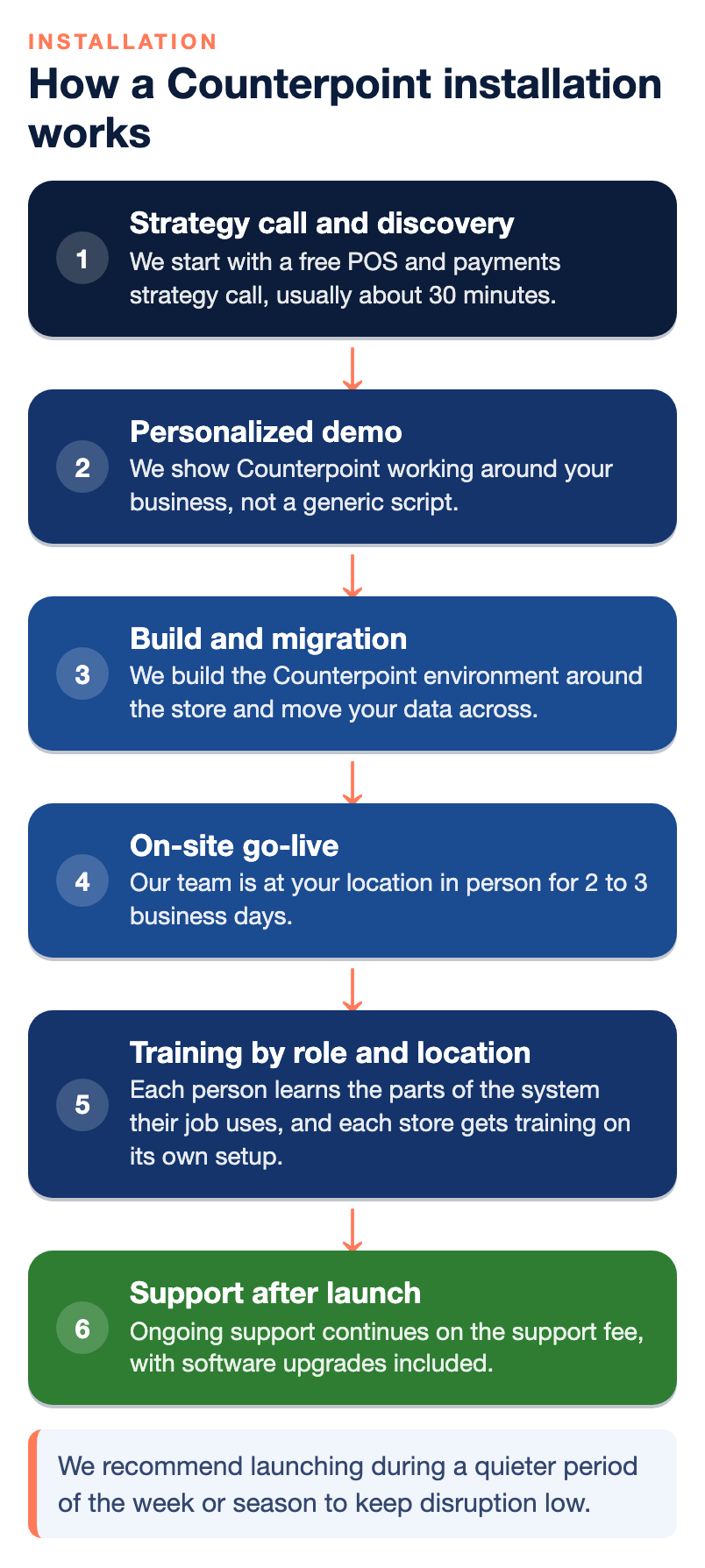
- A strategy call and discovery. We start with a free POS and payments strategy call, usually about 30 minutes, to see whether Counterpoint is the right fit. Then we look at how the business runs today: the current POS, number of locations and registers, inventory and SKUs, users, pricing structures, customer database, accounting, ecommerce, payments, reports, integrations, hardware and any custom functionality you rely on.
- A personalized demo. We show Counterpoint working around your business, not a generic script. Bring the way you sell, receive and price inventory, transfer stock, manage customers, run reports, handle accounting and take payments, and tell us what your current POS does well and what drives you crazy.
- Build and migration. We build the Counterpoint environment around the store and move your data across. Migration and onboarding are included. This is the time to audit your existing inventory thoroughly, because clean counts going in make for clean reports coming out.
- On-site go-live. When your system is installed, our team is at your location in person for 2 to 3 business days, setting up, testing and training you, your managers and your staff. We recommend launching during a quieter period of the week or season to keep disruption low.
- Training by role and location. Each person learns the parts of the system their job uses, and each store gets training on its own setup. Training is available in person or remotely depending on the project, and ongoing training is included in our package.
- Support after launch. The weeks after go-live are when questions come up, so ongoing support continues on the support fee, with software upgrades included.
Support that runs on one fee, not an hourly meter
Support should not feel like calling an attorney. You should not hesitate to ask a question because you are worried about how many hours will show up on the next invoice. NPS uses a support-fee model rather than billing routine, ongoing Counterpoint support by the hour, which gives you predictable technology costs. You can call when you need help, ask questions and get assistance with the system without watching the clock.
The people who answer are a dedicated Counterpoint team. They install it, configure it, support it, program it, troubleshoot it, customize it and migrate businesses onto it. That matters, because many technology companies support several unrelated POS platforms, and the technician on your call may have worked on a different system that morning. When your retail environment is complicated, you want people who work with your platform every day.
With NPS you get a dedicated account manager, full onboarding and training, help with setup, software and integrations, and developer support for custom applications. Our office is open during business hours, roughly 9 or 10 in the morning until 6 in the evening, and merchants reach around-the-clock support through the help desk for the product they use. One number covers hardware, software and payments, so you are never stuck working out which vendor to call.
Most POS providers sell the software and disappear. We do not.
Already on Counterpoint? Switching your dealer to NPS
You do not have to buy a brand-new Counterpoint installation to work with us. If your business already runs NCR Counterpoint, NPS can take over your ongoing support. A lot of owners like Counterpoint itself and are unhappy only with the dealer behind it, and that problem has a simpler fix than replacing the system.
Six signs your Counterpoint dealer is failing you
- Support is slow. You wait hours, or days, for an answer to a problem that is stopping sales, and your team works around it in the meantime.
- Your staff was never fully trained. If your people use a fraction of what Counterpoint can do, you are paying for features you never get the benefit of.
- The service is generic. Your business is particular, and a dealer who does not tailor the setup to your industry and your workflows leaves value on the table.
- You pay more than you should for processing. Some dealers bundle unnecessary costs into their contracts, and the card processing line is often where it hides.
- The system lags, crashes or does not sync. Frequent slowdowns or data that does not line up are a clear sign the software is not being maintained or tuned properly.
- Nobody brings you improvements. A good dealer anticipates problems and offers upgrades, security patches and process changes before you ask. If yours only reacts, you fall behind.
A takeover also suits stores that are charged by the hour for every issue, that need customization their current provider cannot handle, that want better payment integration, or that want help modernizing an older installation.
What a support takeover involves
The conversation is different when you already own the system, because you may not need another POS at all. You may simply need better support. We review your current version, hardware, payment processing, existing customizations, plug-ins, database, reports, integrations and support needs, and then we tell you whether NPS can take over the environment and what it would take.
There is one important requirement. To move your Counterpoint support to NPS, your payment processing must also move to NPS. We combine the two on purpose, because the POS and the payments are part of the same transaction environment, and one partner responsible for both is how you stop the blame from going back and forth.
If your Counterpoint is several versions behind, the takeover is also a good time to talk about upgrading. Older versions may still run, but they often lack modern payment integrations, current security standards, ecommerce integrations and faster database performance, and they tend to depend on aging hardware and operating systems that carry their own security and reliability risks.
Custom programming and consulting for specialty stores
Every retailer does something a little differently, and sometimes the POS should bend to the business rather than the other way around. Custom programming is one of Counterpoint’s biggest advantages and one of our core capabilities. We build specialized reports, custom fields, custom workflows, special pricing logic, industry-specific processes, custom integrations, data exports, dashboards, accounting and ecommerce connections, and payment integrations. Counterpoint also provides an API environment that supports third-party applications and integrations.
Over the years we have built custom functionality for many different kinds of businesses. If you ask for something and we already have programming that does what you need, we can include that existing work in your solution instead of starting from scratch, which can cut development time, project complexity, cost and delays. There is no reason to reinvent something that has already been built and proven.
Retail consulting, not just installation
For specialty stores that want more than a new system, our consulting work starts with a deep look at your products, your challenges and your goals. We look for where you are losing efficiency or margin, identify where an upgrade or automation would pay off, help you control costs and lay out a technology roadmap for the next stage of growth. That can include mobile checkout and remote access, data collectors, age verification, accounting and ecommerce connections, and multi-location management. We have worked with NCR systems for more than 20 years, and that experience is what we bring to the table, along with a team that knows Counterpoint inside and out.
Comparing Counterpoint with other systems
Counterpoint is not the only serious retail system, and we would rather you compare than wonder. If you are weighing it against a cloud subscription POS, read our NCR Counterpoint vs. Lightspeed Retail comparison. We sell and support Counterpoint and we do not sell Lightspeed, so that page says plainly which stores each one fits.
If your store started on a simple countertop or tablet system and has grown past it, two of our articles go through that move step by step: why retailers who outgrow their first countertop POS switch to NCR Counterpoint, and why large retailers upgrade from a tablet POS to NCR Counterpoint. For more on payments, pricing models and POS decisions in general, browse our payments guides.
How to get started
Choosing a POS from a website or a feature checklist is hard, and we do not think you should replace yours until you have seen a full demo built around your store. Here is how we start:
- A free POS and payments strategy call, about 30 minutes, to see whether Counterpoint fits.
- A personalized demo based on how your business actually runs.
- Migration and onboarding included if you go ahead.
- No pressure. If it is not the right fit, we will tell you.
If you already run Counterpoint, the first step is a review of your current setup instead, so we can tell you whether a support takeover makes sense. Either way, contact our team to schedule the call.
The bottom line
If your store carries a large or complicated catalog, prices the same item several ways, runs more than one location or sells regulated items, NCR Counterpoint is the system we would put in, and buying it through NPS means one partner installs it on site, processes your cards, supports it on a support fee instead of an hourly meter and writes the custom work when you need it. If you already own Counterpoint and the problem is your dealer, switch the support, not the system, and remember that the processing moves with it. If your store is small and simple, do not buy more POS than you need. Start with a demo built on your own store, and make the decision on what you see.
Frequently Asked Questions
What is NCR Counterpoint used for?
NCR Counterpoint is a specialty retail management system. It runs point of sale, inventory, purchasing, pricing, customer accounts, loyalty, reporting and multi-location operations in one platform, so specialty retailers do not need separate tools for each job.
Who is NCR Counterpoint best for?
It is best for inventory-heavy specialty retailers, such as firearms and sporting goods stores, nurseries and garden centers, feed and pet stores, liquor stores, independent grocers, apparel stores and multi-location retailers. A small store with a simple catalog is usually better served by a smaller retail POS.
How much does NCR Counterpoint cost?
There is no single price, because the total depends on how many stations you run, the hardware you need or can reuse, installation and training, custom programming, the support fee and your card processing. Through NPS, Counterpoint is licensed by station with unlimited users, software updates are included and financing is available. Ask for a written quote built on your own store.
Can NPS take over support for my existing Counterpoint system?
Yes. NPS can take over support for an existing Counterpoint installation without selling you a new one. To do that, your payment processing must also move to NPS, so one company is responsible for both the POS and the payments.
Does NPS charge by the hour for Counterpoint support?
No. NPS supports Counterpoint on a support-fee model rather than billing routine, ongoing support by the hour. That keeps your costs predictable and means you can call with a question without worrying about the clock.
Can NCR Counterpoint handle multiple store locations?
Yes. Counterpoint is built for multi-location retail, with central control over inventory, pricing, purchasing, transfers, customer information, reports and staff access. It works for one store, five stores, fifty stores or more.
Does NCR Counterpoint integrate with Shopify, WooCommerce and QuickBooks?
Yes. Through NPS, Counterpoint integrates with Shopify, WooCommerce and WordPress, Magento, BigCommerce and other ecommerce platforms, and keeps inventory, pricing and orders in sync. It also integrates with QuickBooks to reduce manual accounting work.
Can I keep my existing POS hardware with Counterpoint?
Often, some of it. Depending on compatibility, existing stations, displays, scanners, label and receipt printers, scales, terminals and mobile devices may be reusable. We check your equipment during discovery and tell you what can stay and what needs replacing.